




master75-2

Online Petition

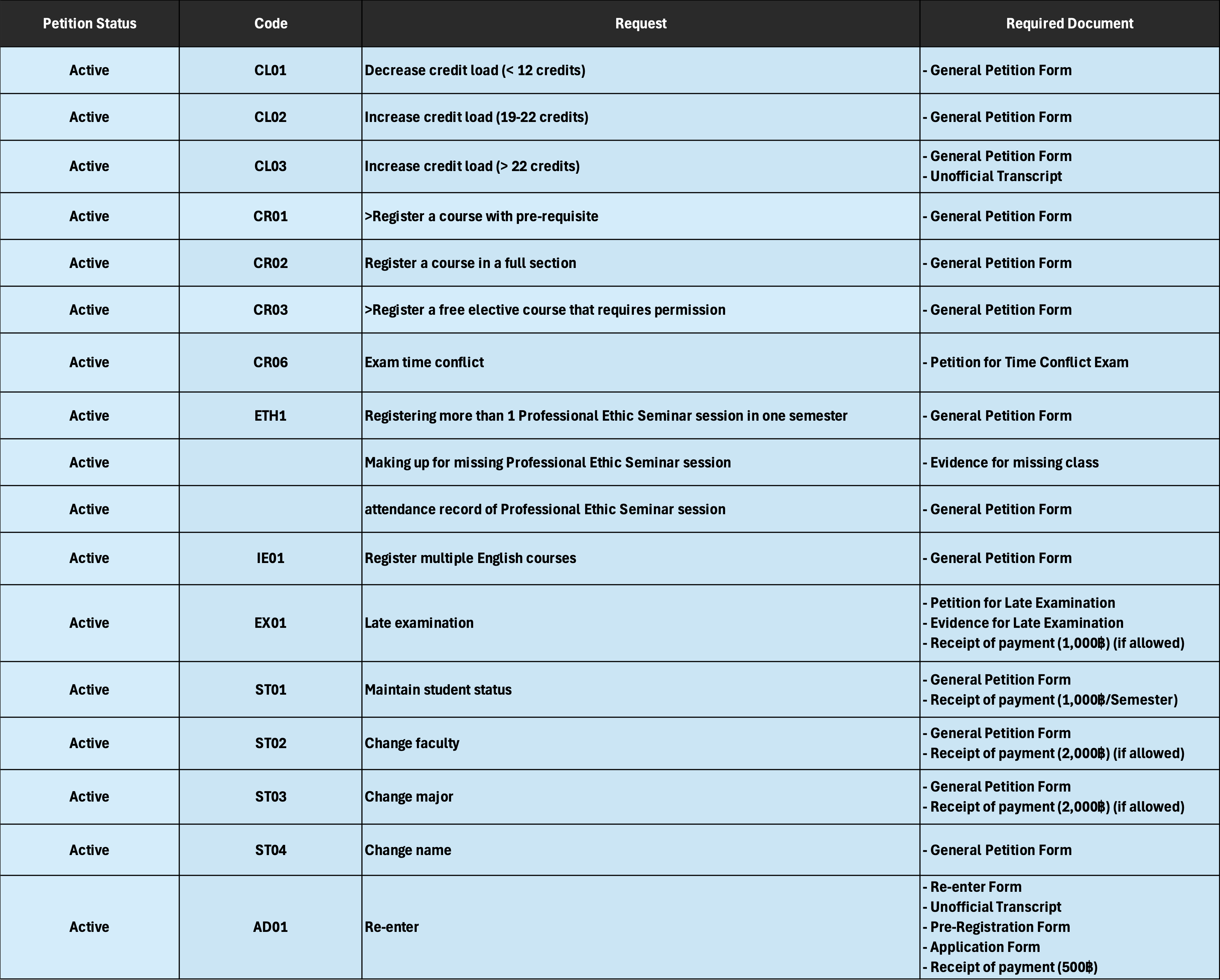
Online Petition Late Payment for semester 2/2025 can be submit during 16 – 24 October, 2025 on Au Spark

Instruction for submit online petition on Au Spark

  1. Click Here to Download General petition Form
  2. Fill in your information
  3. Submit petition at New Faculty to get approved from the Dean
  4. Submit the approved petition at current Faculty to get approved from the current Dean
    **(Scholarship students please contact scholarship division before proceed the next step)**
  5. Make a payment at Finance Office (SM114) 2,000฿(if allowed)
  6. Submit petition and receipt at Registrar Office(SM116) Counter 3

  1. Click Here to Download General petition Form
  2. Fill in your information
  3. Submit petition at New major Faculty to get approved from the Dean
  4. Submit the approved petition at the current major to get approved from the Dean
    **(Scholarship students please contact scholarship division before proceed the next step)**
  5. Make a payment at Finance Office (SM114) 2,000฿(if allowed)
  6. Submit approved petition and receipt at Registrar Office

  1. Click Here to Download General petition Form 
  2. Fill in your information
  3. Submit petition at the Faculty to get approved from the Dean
  4. Make a payment at Finance Office(SM114)
    - Bachelor Degree All ID up to 674-xxxx 1,000 THB /semester (if allowed)
    - Bachelor Degree 68x-xxxx onwards 5,000 THB /semester (if allowed)
    - Master Degree (Trimester System) 4,900 THB /semester (if allowed)
    - Master Degree (Semester System) 5,300 THB /semester (if allowed)
    - Doctoral Degree 6,800 THB /semester (if allowed)           
  5. Submit the approved petition and receipt at Registrar Office(SM116) Counter 3
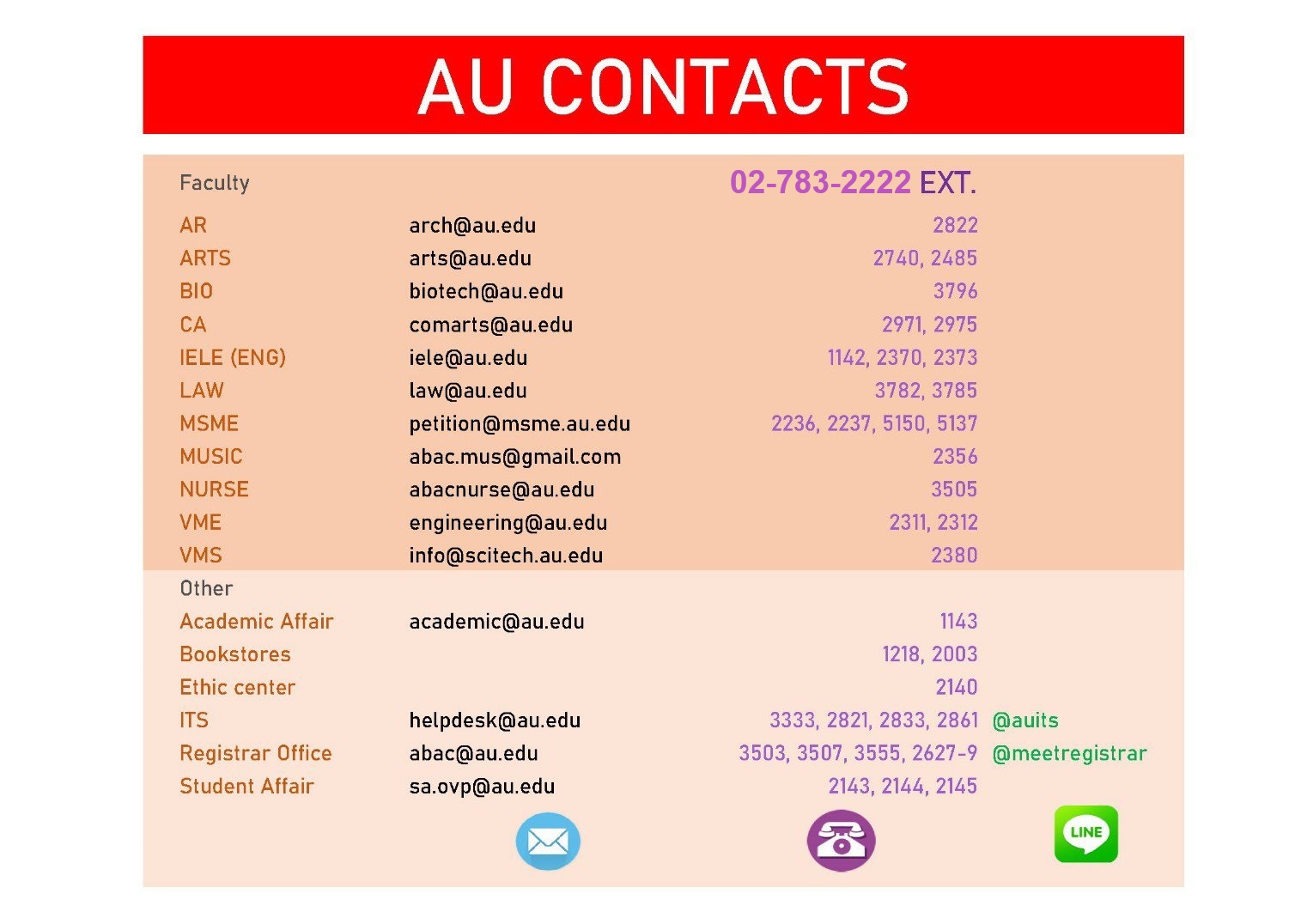
    More information contact Profile division Tel. 02-783-2222 Ext. 3507 or Email: [email protected]

  1. Click Here to Download General petition Form
  2. Fill in your information
  3. Submit petition at Faculty of the course to get approved from the Director or the Dean
  4. Wait for the Faculty to process the approved petition.

  1. Click Here to Download General petition Form
  2. Fill in your information
  3. Submit petition at the Faculty to get approved from the Dean
  4. Submit approved petition at Registrar Office(SM116) Counter 2

  1. Click Here to Download General petition Form
  2. Fill in your information
  3. Submit petition and unofficial transcript at the Faculty to get approved from the Dean
  4. Submit approved petition at Registrar Office(SM116) Counter 2

  1. Visit SM116 Counter 1 to get Grade verification petition
  2. Fill in your information
  3. Submit it at Faculty of the subject to get approved from the Director or the Dean

  1. Click Here to Download Petition Exam Time Conflict
  2. Fill in your information
  3. Submit petition at Faculty to get approved from the Director or Dean
  4. Submit approved petition at Registrar Office(SM116) Counter 2

  1. Click Here to Download Petition Exam Campus Conflict
  2. Fill in your information
  3. Submit petition at Registrar Office(SM116) Counter 2

  1. Click Here to Download General petition Form
  2. Fill in your information
  3. Submit petition at Ethic Center to get approved from the Director Ethic Center 02-7832222 Ext. 2140
  4. Wait for Ethic Center to process the approved petition.

  1. Click Here to Download General petition Form
  2. Fill in your information
  3. Submit petition at IELE to get approved from the Director IELE 02-7832222 Ext. 1142, 2370, 2373 or [email protected]
  4. Wait for IELE to process the approved petition.

  1. Fill in the require information form provide by Office of Academic Affair, Tel. 02-783 2222 Ext. 1143
  2. Submit the evidence along with the petition form
    In case of “sickness” – Medical Bills, Medical certificate and Medical records
    In case of “Death of a person in family” – Death certificate of the person
    In case of “Accident” – Insurance claim, police report and pictures of damage(s) on the car
  3. Wait for the Office of Academic Affair to process the petition.
4. Check the result on the announcement date at www.registrar.au.edu

Student have to download Petition form below and submit to your faculty accordingly.

Form For Download

DSC_0104

AU Spark

Registration & Payment System for Student

AU SPARK is provided for Assumption University’s students. It allows students to access the academic information, class schedule and exam schedule. AU SPARK also provides both registration & payment feature.


Registration & Payment Guideline for Student

Registration is the confirmation that in the semester of registration, you confirm that you will study all the courses selected in the Planner.